Product update: the redesigned tenant panel
A sidebar organised into groups, a dashboard with today's indicators, and quick search that finds pages, customers, invoices and products.
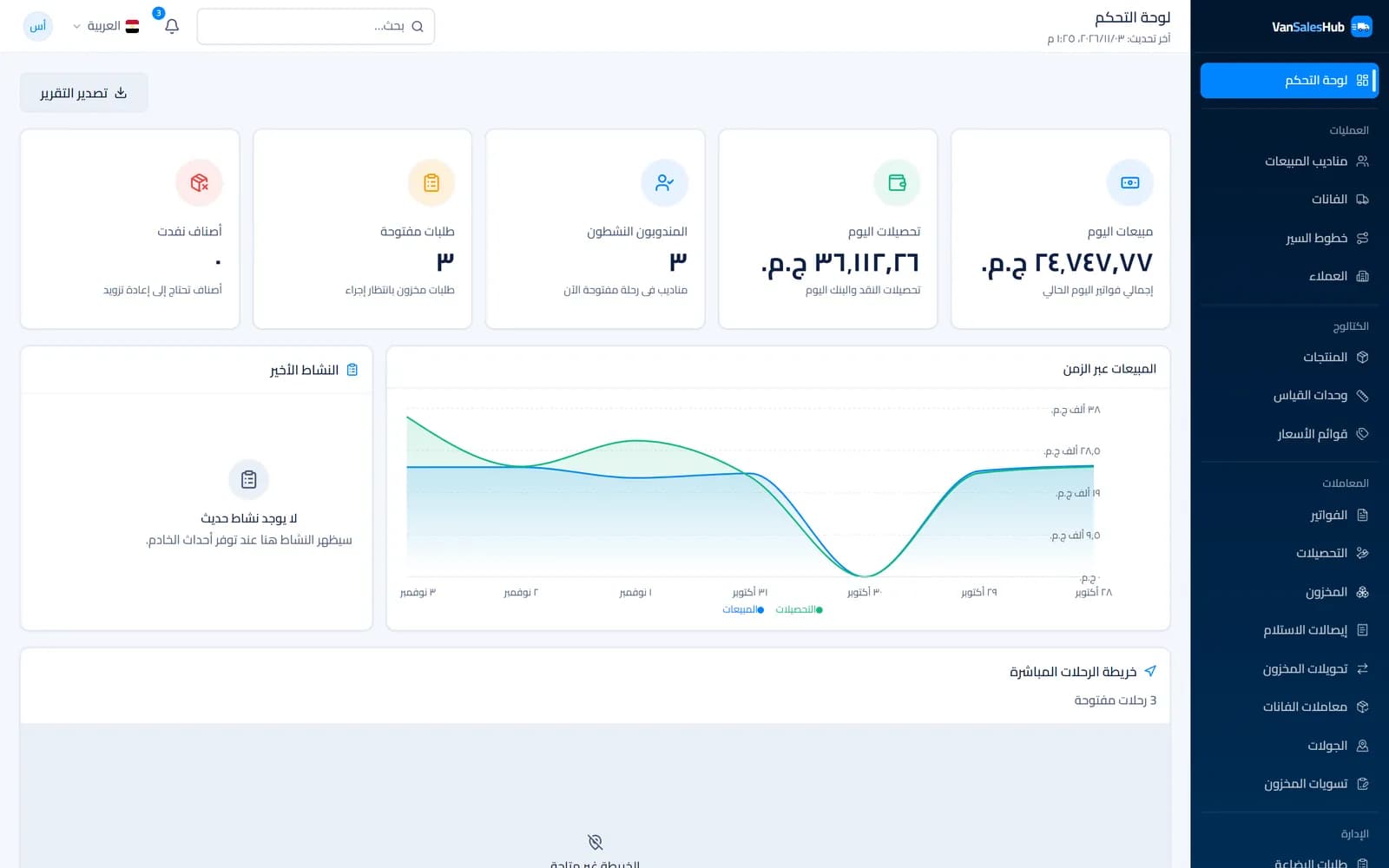
The dashboard is where your office team spends its day: reviewing invoices, following reps, and setting prices and routes. As new screens were added over the past months, it became necessary to reorganise them so everyone can reach what they need without hunting.
Here is a summary of what changed, and why.
A sidebar with clear groups
Instead of one long, flat list, pages are now arranged in groups that reflect how a distributor works:
- Operations: Sales Reps, Vans, Routes, Customers.
- Catalog: Products, Units, Price Lists.
- Transactions: Invoices, Collections, Inventory, Goods receipts, Stock transfers, Van transactions, Journeys, Stock adjustments.
- Management: Requisitions, Reports, Subscription & billing, Settings, Languages, Users & Roles, Audit Log.
- Support: Notifications, Help.
The menu follows permissions: each user only sees the pages they are allowed to use. A collections clerk's menu is not crowded with tax settings, while a manager sees everything.
A dashboard that starts with today's numbers
The first thing you see after signing in is five indicators: today's sales, today's collections, reps active on an open journey right now, open requisitions waiting for action, and out-of-stock items. Below them are a sales chart, a live map of reps on open journeys, and rankings of top reps, customers and products.
The goal is to know at a glance whether the day is on track, then drill into details when you need to.
Quick search across everything
The header has a Quick search box: type a page name such as "Collections", a customer name, an invoice or return number, or a product, rep or user name, and jump straight to it. Ctrl K opens it too. It is especially handy for anyone moving between many pages all day.
Results only include the kinds of records you have permission to see. For detailed filtering, each section page still has its own filters.
Pages that explain the field day
Recently we added pages that make the rep's work visible to the office:
- Journeys: every journey a rep opened, with its duration and status. Inside, the Journey track on a map and Plan and actual comparing planned customers with those actually visited.
- Van transactions: every loading, unloading, stocktake and receiving, with its status.
- Notifications: an alert if the company start time passes and a rep has not started, or if a journey closes with customers still unvisited.
Reports you can export to Excel
In Reports, choose a report, set the period, then export the result to Excel. Available reports include sales by rep, sales by product, collections by rep, and customer balances.
Detail pages with tabs
Each customer, van and rep page is now split into tabs, so you find information without long scrolling:
- Customer: Profile, Address & GPS, Pricing & Credit, Routing, Invoices, Visits, Activity.
- Van: Overview, Current Stock, Transaction History, Maintenance Log.
- Rep: Profile, Assignments, Activity, Performance, Documents.
When a customer calls about their balance or last invoice, the answer is on their page, without jumping between screens.
Subscription on its own page
Subscription management moved out of Settings to its own Subscription & billing page under Management. It shows the subscription status, its invoices and the payment steps. If the account becomes read-only, a clear banner at the top of the panel explains why and takes you to that page.
Arabic and English interface
The panel works in Arabic, right to left, and in English. Each company can also choose the content languages its team uses for customer and product names, and the forms show a field for each enabled language.
What's next?
We keep improving the panel based on feedback from the companies using it every day. If you have a note about a particular screen, or find something hard to reach, write to us from the contact page; that feedback sets our priorities.
If you have not tried the panel yet, you can create a 14-day trial account with no credit card and explore it yourself.